

 Application form
 Appointment
- Contact Us
- Help by E-MAIL
- COPYRIGHT ©2023CVASC, ALL RIGHTS RESERVED
How to cancel an application submitted online?Is there a limit to the number of cancellations?
2025-11-27

Usually, the same passport cannot be used to submit two or more visa application forms at the same time. If you need to reapply due to mistakes in selecting the country, canceling your trip, changing the purpose of your visit to China, etc., you must first cancel the existing application before proceeding to fill out a new form. To cancel an online submitted application, please follow the steps below:
1. Before the online review is completed:
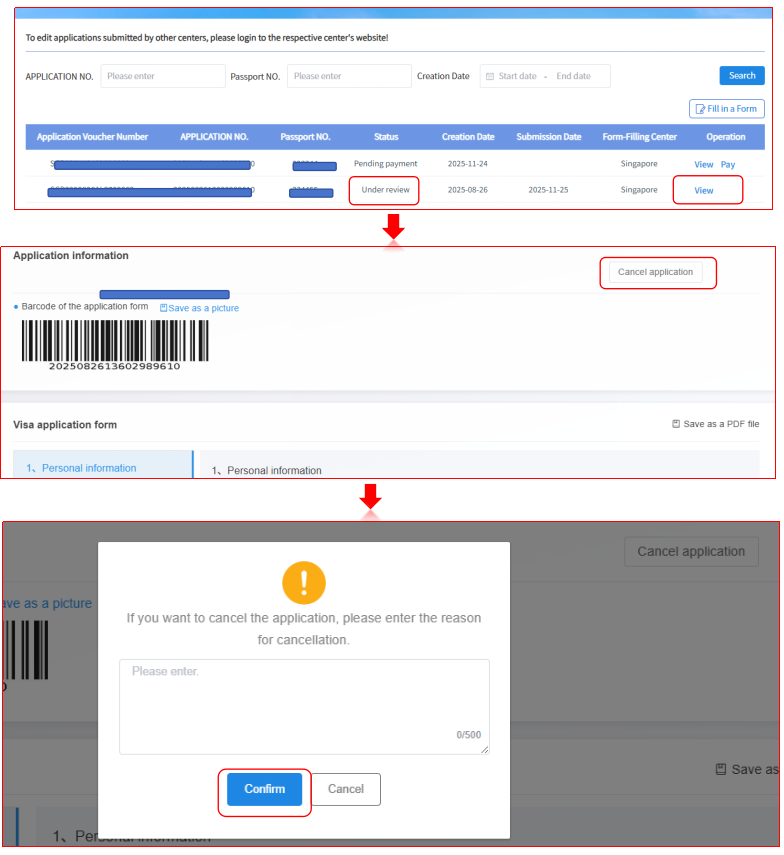
When your application status is “Under review”, if you need to cancel your application due to a trip cancellation or other personal reasons, please click “View” on the right side of the list. After the page displays, click the “Cancel Application” button in the upper right corner, fill in the reason for cancellation, and confirm. Cancellation request needs to be approved and the visa center will assist you in canceling the application on working days as soon as possible.
If the application status is updated to “Online review completed”, it means you can submit your application at the visa center. Please print the email attachment “Visa Application Certificate” and bring it along with your passport and other materials (see the material requirements in step two) to the visa center.
Note: If an application submitted online is cancelled twice within a short period of time using the same passport, a new application can only be submitted after 30 days.
2. After the online review is completed:
At this point, the status of your application will be “Online review completed”, which means that your application has been officially reviewed and necessary preliminary work has been completed. Starting from January 1, 2026, if you request to cancel your visa application for personal reasons, you (or an authorized representative) need come to the Center in person to complete the cancellation process and pay service fee. The visa fee may be waived.
To avoid incurring unnecessary costs, please carefully verify all information and make appropriate travel arrangements before submitting your application.